


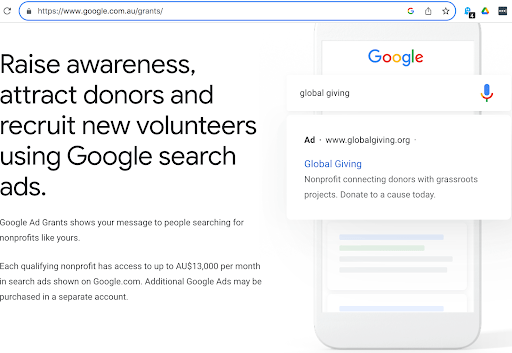
The Google Ads Grant is an amazing opportunity for not-for-profits (NFPs) to expand their reach and impact through digital advertising. It provides up to AU$13,000 per month in free advertising on Google’s search network. With a well-optimised account, this grant can be used to enhance your organisation’s visibility, attract more supporters, and drive traffic to your website. Follow these steps to set up and succeed with your Google Ads Grant. Now let’s dive into how to get started…
1. Check eligibility and apply for the Google Ads Grant
Before planning your campaign strategy, ensure your organisation is eligible for the Google Ads Grant. To qualify, your NFP must:
- Be registered as a charitable organisation in your country
- Have a website that meets Google’s criteria (live and offering meaningful content)
- Agree to Google’s non-discrimination and donation receipt policies
Once you meet the requirements, apply for the grant through the Google for Nonprofits program. After submitting your application, you’ll need to wait for approval. Be prepared for a verification process that may take a few weeks.
2. Set up your Google Ads account
Upon receiving your approval, it’s time to set up your Google Ads account:
- Create a Google Ads account if you don’t already have one. You’ll use this to manage your campaigns and track performance.
- Link your Google Ads account to Google for Nonprofits to access the grant funds.
3. Develop a strategic campaign
To launch a successful Google Ads campaign, a strategic approach is essential. Here’s how to lay the groundwork:
- Define your goals: Identify what you want to achieve with your ads, such as increasing donations, boosting event attendance, or raising awareness for a cause.
- Understand your audience: Research and define your target audience’s interests, demographics, and search behaviours to tailor your ads effectively.
- Identify what you want to achieve with your ads. Whether it’s increasing donations, boosting event attendance, or raising awareness for a cause, clear goals will guide your campaign strategy.
- Conduct keyword research: Use tools like Google Keyword Planner to find relevant keywords for your campaigns. Focus on terms that potential supporters might use to find organisations like yours. It’s a fine balance of keeping your keywords broad for reach, and yet targeted, for better conversion rates. After you launch your campaign you’ll soon realise what works and what doesn’t, and you can refine and do more keyword research as you gain learnings post campaign launch.
With the rise of AI for marketers, it’s also worth staying up to date with the latest trends and how you can apply it to your NFP. Here’s a snapshot of how AI is transforming NFP marketing:
- The rise of ultra-personalised donor experiences
- Automated customer/donor service interactions
- Easy personalisation at every step of the donor journey
- AI’s ability to process vast amounts of data and derive actionable insights
To learn more about applying AI to your marketing strategy and how AI-powered Google advertising solutions can increase donations for your not-for-profit organisation, download our free eBook Accelerate growth with AI for not-for-profits.
4. Create compelling ad copy and landing pages
Clear, compelling ad copy and relevant landing pages are critical to converting clicks into actions:
- Write engaging ad copy: Craft ad headlines and descriptions that are clear, compelling, and relevant to your audience. Highlight your unique value proposition and include a strong call to action (CTA).
- Design optimised landing pages: Ensure your landing pages are relevant to your ad copy and offer a seamless user experience. They should load quickly, be mobile-friendly, and have a clear CTA.
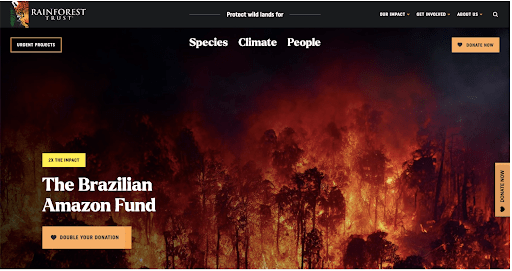
Example of a good landing page design:
What they did well:
- The NFP’s purpose is immediately conveyed through a photograph that takes up the entire landing page.
- The page effectively communicates the distressing situation, with statistics (under the fold) “2.9 million acres of forest in Brazil destroyed in 2022 alone,” creating a sense of urgency.
- The objective to save 20 million acres of intact forest and lock up 6 billion metric tons of CO2 is featured, providing clarity on the impact of donations.
- There are three CTAs above the fold: one in the navigation menu, another below the headline, and a third fixed to the side of the page, in other words, the user won’t miss the most important action that the NFP wants the visitor to achieve.
5. Set up and manage your campaigns
When ad copy and effective landing pages are established, it’s time to dive into campaign management:
- Create campaigns and ad groups: Organise your ads into campaigns and ad groups based on themes, goals, or target audiences. This structure helps in better managing and optimising your ads.
- Set bids and budgets: With the Google Ads Grant, your bids are capped at $2.00 per click. Allocate your budget across your campaigns to maximise exposure within these limits.
- Monitor and adjust: Regularly review your campaign performance using Google Ads’ reporting tools. Track metrics such as click-through rates (CTR), conversion rates, and cost per click (CPC). Make adjustments to improve performance based on this data.
6. Adhere to Google’s policies and best practices
To maintain your grant and ensure effective campaigns, adhere to Google’s policies and best practices:
- Follow Google’s policies: Ensure your ads comply with Google’s advertising policies, including those specific to NFPs.
- Avoid overlapping keywords: Use a structured approach to keyword selection to prevent competition between your ads and ensure they are effective.
- Optimise regularly: Continuously refine your campaigns based on performance data. Test different ad variations, adjust bids, and optimise landing pages to enhance results.
7. Leverage additional resources
Take advantage of resources available to help you succeed with your Google Ads Grant:
- Google Ads Help Center: Utilise the Help Center for guides and tutorials.
- Google Analytics 4 (GA4): Integrate Google Analytics with your Google Ads account to gain deeper insights into your traffic and conversions.
- NFP communities: Engage with other NFP organisations using Google Ads to share tips and experiences.
Getting started
Setting up and succeeding with a Google Ads Grant requires a thoughtful strategy, ongoing management, and a willingness to adapt to the ongoing platform updates. By following these steps, your NFP can make the most of this valuable resource, reaching more people, and driving greater impact.
Google Ads can be confusing, and setting up a new account that relies heavily on signals from GA4 can take a lot of time to work out alone.
Not sure what’s best for your business and need guidance in getting started? Or do you have a Google Grants account and need assistance in improving results? maxemus Digital Marketing has assisted many nonprofit organisations in setting up Google Grants and optimising their campaigns. Over the last 5 years we’ve managed over $765,000 in free ad spend for our NFP clients to support their sustainable growth. We can help you maximise your return from your Google Ads Grant.
Book an independent, no-obligation Google Ads strategy session for a free account review.
We’ll provide you with a growth-driven strategy to optimise and scale your Google Ads Grant.
